
Release Notes
Every feature, fix and refinement shipped to Dynamic Menu Bar, newest release first. The app checks for updates on its own; the current version is 1.0, and the download is always the latest build.
v1.0New
macOS 27, and Settings rebuiltDynamic Menu Bar is ready for macOS 27 Golden Gate, with the overlay, the Pill capsule, the corner rounding and the hairlines tuned for what changed in it. The Settings window is rebuilt around a toolbar, a searchable sidebar and centered page headers, and the License and About pages are redesigned.
New
- Full support for macOS 27 Golden Gate. Dynamic Menu Bar runs on it natively, and the parts that sit closest to the system — the menu bar overlay, the Pill capsule, the corner rounding and the hairlines — each take a path written for what macOS 27 changed, rather than the macOS 26 one.
- The Settings window has a toolbar. Back and Forward walk the pages you visited while the window is open, and the editing-scope selector sits at the top right. The master switch is no longer in the window: while the app is off, every page opens with a notice that turns it back on.
- A search field at the top of the sidebar filters the pages by name and by words taken from each page. Return opens the first match, Escape clears it.
- Every page opens with a centered header: the page’s icon, large, over its title and description.
- Settings › License, rebuilt: a picture of this Mac, its model name and macOS version, your key shown masked with a click to copy it, the seat count, the owner’s e-mail, and one row per seat with Deactivate for this Mac. Buy now sits in the toolbar.
- Settings › About, rebuilt: the app’s icon, name, version and description over cards for Changelog, Export Logs and Send Feedback. The update status sits in the toolbar — Up to date, Update available or Checking… — and a click runs the check.
- On macOS 27 the right Pill capsule is back: it follows the status items again. Hidden status items you reveal get a capsule of their own, which merges into the left one when the two touch.
Improvements
- The controls in Settings take the app’s own orange instead of the system accent colour.
- The Multicolor stops sit in a fixed row of ten equal slots across the card. The first empty slot adds a colour, and the separate + button is gone.
- The Settings window opens taller, so the sidebar’s last row sits as far from the window’s bottom edge as from its left edge.
- Nothing blurs at the top of the Settings window any more: content passes under the toolbar sharp, and the band that appeared when the pointer entered the top area is gone.
- On macOS 27 the overlay, notch and corner hairlines are dimmer in Dark and exactly one screen pixel wide in Light.
- The Accessibility texts on the Pill page, in the welcome tour and in the popover say what the permission is really for.
- The BETA badges are gone from the overlay stroke and corner stroke switches.
Fixes
- The status item’s right-click menu opens like every other menu bar menu: no scroll chevron, and its first row is there before you move the pointer.
- On macOS 27 the corner rounding editor shows your wallpaper in its preview again, instead of the placeholder.
- The empty round button that flashed at the top of the Settings sidebar is gone.
- Replacing your license key no longer leaves the previous key’s owner e-mail and seat limit on screen if the keychain refuses the write.
- The License page no longer guesses your seat count. When the server’s number is not stored it shows a dash instead of a figure taken from the tier.
v0.9.4Beta
Excluded Apps, reworkedExcluding an app now keeps it out of the color sampling instead of hiding the overlay on its own, plus a fix for the notch settings and steadier top-corner colors.
Improvements
- Excluding an app no longer hides the overlay or pauses capture on its own. Its windows are kept out of the color sampling instead, and it no longer makes the bar freeze or step aside; whether the overlay shows over that app now follows your other settings.
- An excluded app’s per-app profile no longer follows it. You can still pick, preview and save that profile in Settings.
- Unless Hue drift is on, top corners set to Follow overlay now average a short stretch of the screen beside them, so a single icon edge or window border no longer sets their color on its own.
- Export Logs no longer lists the apps you added to Excluded Apps or to per-app profiles; it shows only how many there are.
- The Excluded Apps page describes what exclusion does in this version.
Fixes
- An app you exclude is kept out of the color sampling when it starts later too, including after you quit and reopen it.
- The notch settings (Stroke notch fade, Notch stroke and Overlay notch fade) no longer depend on which display holds the focused window.
v0.9.3Beta
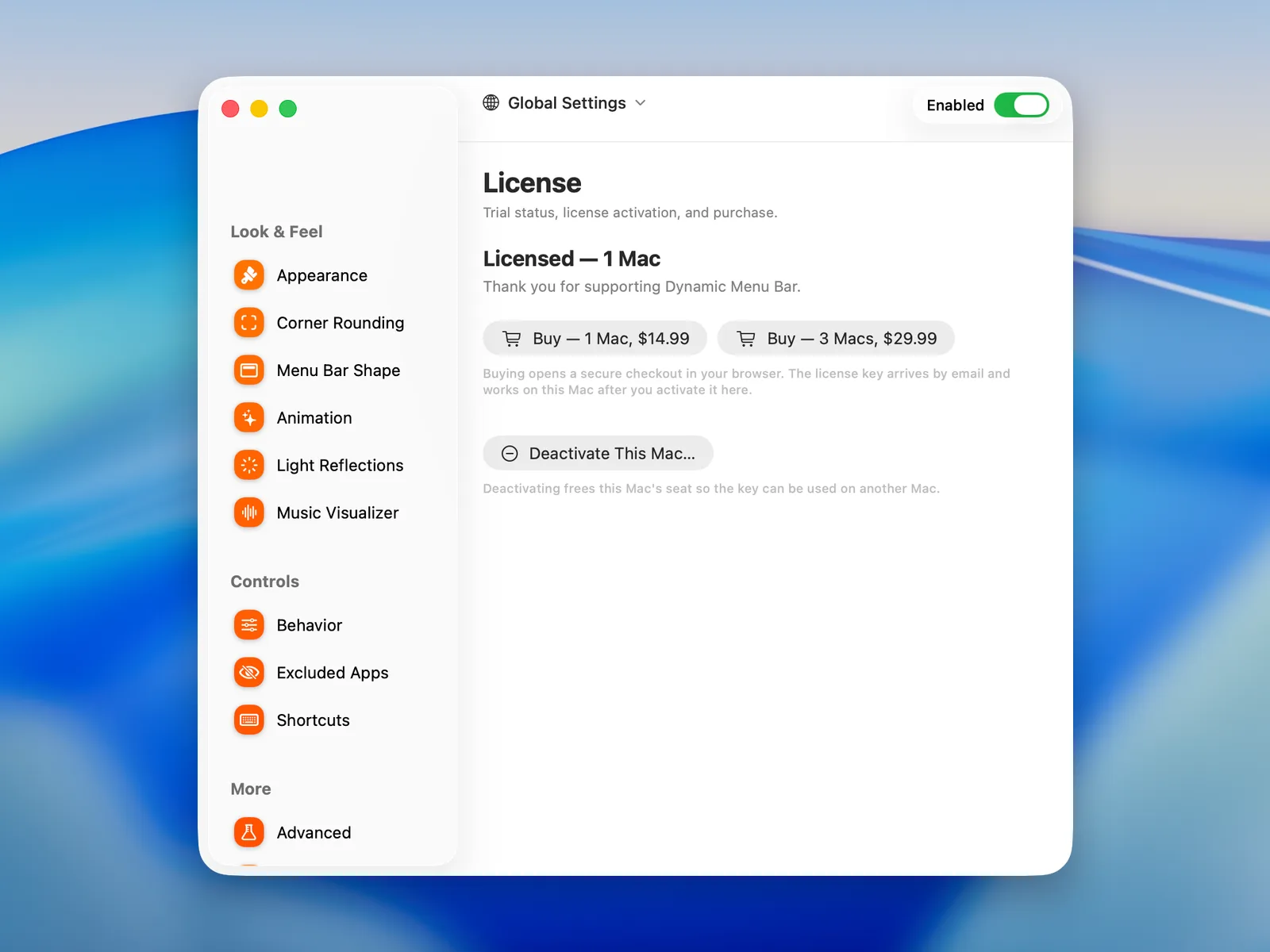
The launch releaseThe build the site launched with: a 7-day free trial and license activation, better defaults for a fresh install, and Check for Updates in About.
New
- A 7-day free trial of every feature, started from a new page in the welcome tour: the trial begins when you press Start Free Trial, not on first launch. The page also offers to buy, or sends you to Settings › License if you already have a key; an install updated from an earlier build opens on this page first.
- Settings › License: your trial or license status, activation with the key from your email, purchase for one Mac or three, and Deactivate This Mac… to move the license to another Mac.
- The license is checked at launch and once a day, keeps working when the license server cannot be reached, and survives a reinstall.
- When the trial ends without a license, every feature pauses; the popup, the status menu and Settings say why and point to the License page.
- Check for Updates… in About.
Improvements
- Fresh-install defaults: Solid starts black with Auto-sample off, Multicolor seeds five stops the first time you turn it on, Hue drift starts on Scroll at 2 seconds, and the entrance animation starts on Rise.
- Light reflections start off. The music visualizer’s defaults are now Rainbow bars and Palette waves, the progress bar’s Mono with a 5-second auto-hide, and the overlay stroke with its notch fade is on.
- Updating may move some settings to the new defaults.
- The Excluded Apps page now explains what exclusion does.
- The Settings window opens a little taller, so the sidebar shows every page without scrolling.
v0.9.2Beta
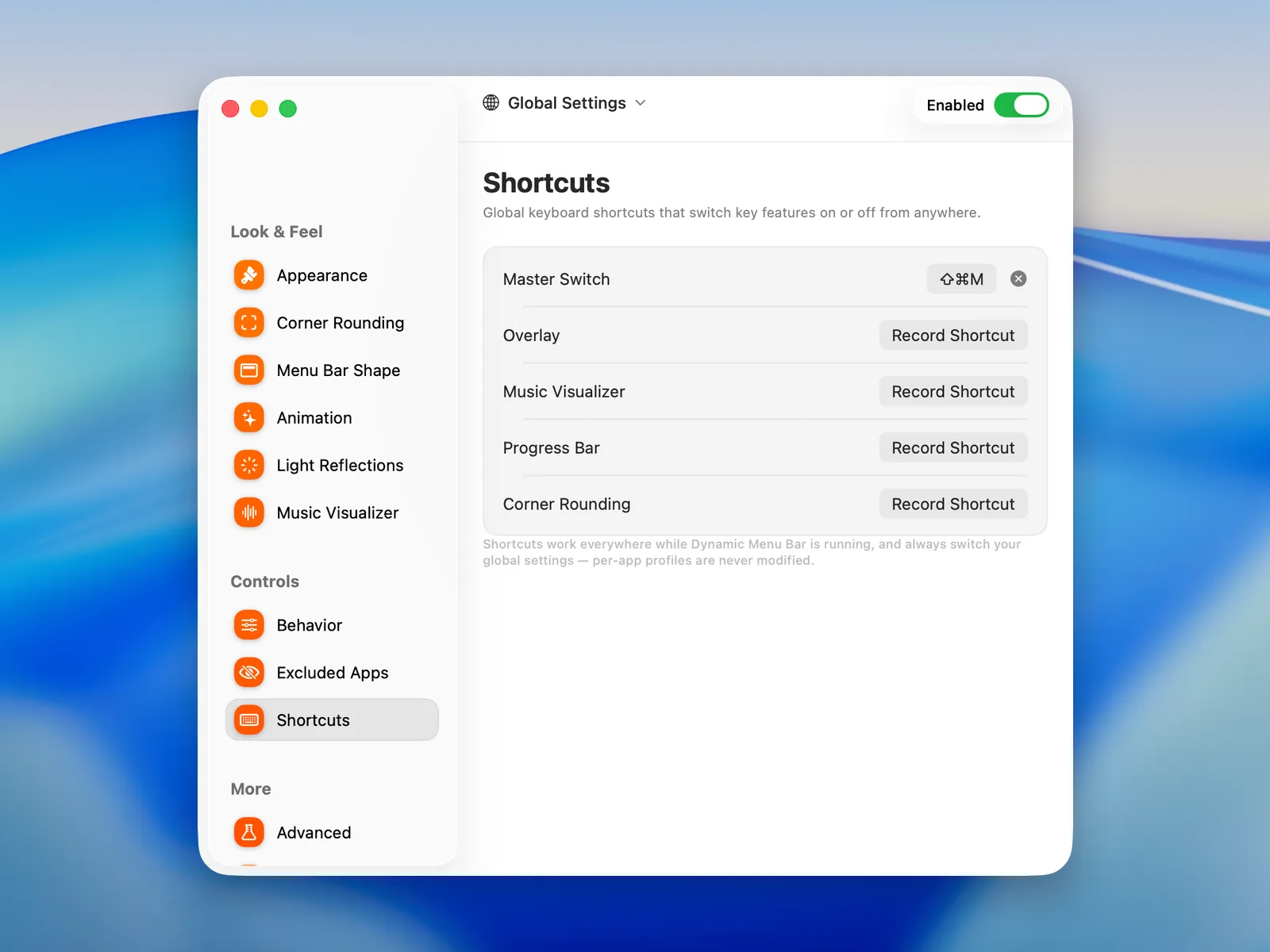
Keyboard shortcutsGlobal keyboard shortcuts for the switches you reach for most, usable from any app.
New
- Shortcuts, a new page under Controls: give the master switch, the overlay, the music visualizer, the progress bar and corner rounding a global keyboard shortcut, and use it from any app.
- Click Record Shortcut in a row and press the keys; Esc cancels, and a combination needs at least one modifier. Nothing is assigned until you choose.
- Conflicts are caught as you record: a combination already used in the app is refused, and one that is also an active macOS shortcut is saved with a warning.
- Shortcuts always change your global settings; per-app profiles are never touched.
v0.9.1Beta
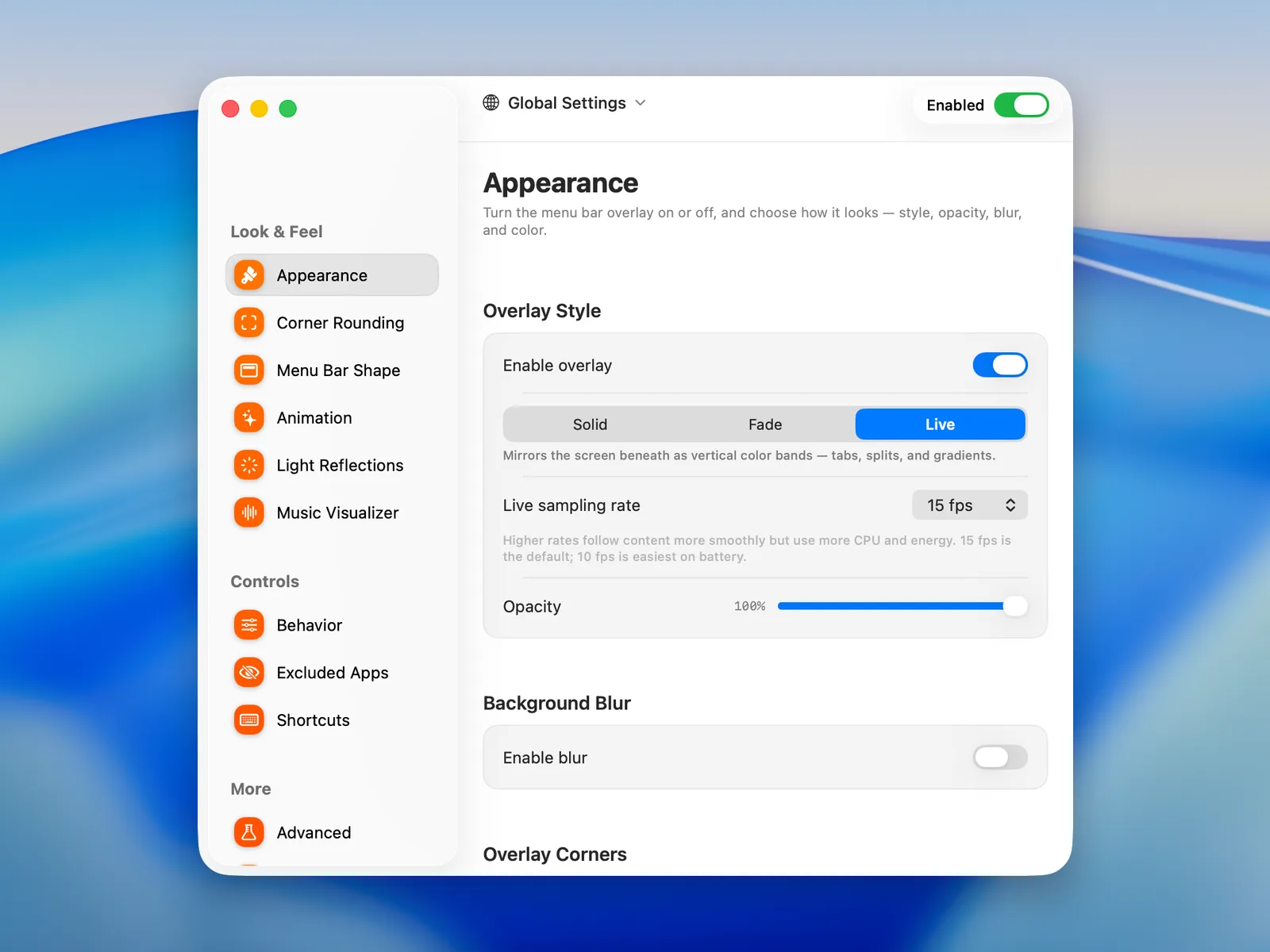
The first releaseThe first build on the update feed: color and shape for the menu bar on macOS 26 Tahoe, a music visualizer and progress bar along the top edge, per-app profiles, and updates that arrive on their own.
New
- Live style: the bar mirrors the screen just under it as vertical color bands, sampled at 10 to 120 fps (15 by default).
- Solid and Fade styles with a color of your choice or one auto-sampled from the screen, Multicolor with up to 10 stops, and Hue drift that cycles the bar through a rainbow or your palette.
- Background blur behind the bar, and overlay corners rounded on the left, the right or both, with radius and color per corner.
- Full Bar or floating Pill shapes for the menu bar: one pill follows the app’s menus, one the status items.
- Rounded display corners, top and bottom, with radius, color, opacity and placement per corner.
- Rise and Spread entrance animations, and Light reflections: a thin beam at the top edge that follows your pointer and glows in the sampled color.
- Music visualizer: bars or waves at up to 120 Hz, in Mono, Solid, Rainbow or Artwork colors plus a Palette for the waves, with a falling trail and a glow that breathes with the music.
- Progress bar: a thin line along the top edge fills with the current track; hold ⌥ and click or drag to seek, ⌥ ← / → skips 10 seconds, ⌥ ↑ / ↓ changes tracks.
- Per-app profiles that switch the look as you switch apps, and Excluded apps the overlay leaves alone.
- Always on, sampling that pauses while the pointer is in the menu bar, and an overlay that can render behind app windows.
- Advanced: an overlay stroke with a fade around the notch (beta), Smooth colors, and Fill Window, which makes the green traffic light fill the window instead of entering Full Screen.
- A welcome tour that grants the permissions and sets the first style; Start at login, a Dock icon you can hide, an About page with Export Logs, and updates the app checks for on its own.
Something you want in the next entry? Say so on the feedback board.